Everyone you love, on one honest map.

Family Nearby is a family locator app that shows where everyone is, and how fresh each location is. Get alerts when they arrive, leave, finish a drive or miss an expected arrival. Need help? One SOS alerts your whole family. No ads, and your data is never sold.

Get it on Google Play

Now live on Google Play

  • No ads, ever
  • Your location is never sold
  • Arrive and leave alerts are free
  • A person answers support in 48 h
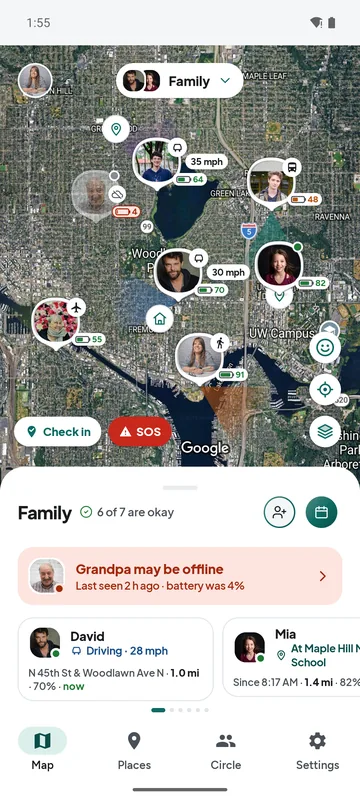
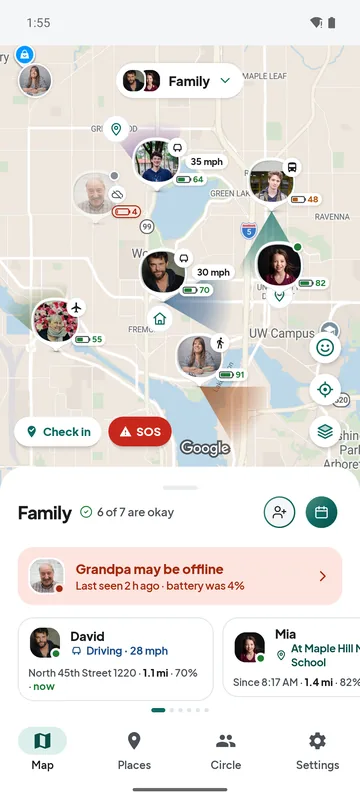
Family map of Seattle with photo pins: Anna walking near home, Leo and David driving with speed and a direction cone, Noah on Link light rail, Grandma flying in, Mia at Maple Hill Middle School, and Grandpa's phone offline with 4 % battery.

Everyone, and how they’re getting there.

Walking, driving, on the train or in the air: each person shows how they are moving and how old their location is. When a phone goes quiet, the app says why.

A demo family. The photos are stock models, not app users.

  • AnnaWalkingnow
  • DavidDriving · 28 mphnow
  • LeoDriving · 34 mph1 min ago
  • NoahOn a bus or train1 min ago
  • GrandmaFlying3 min ago
  • MiaAt Maple Hill Middle School12 min ago
  • GrandpaPhone likely off (low battery)2 h ago

Made for the whole family.

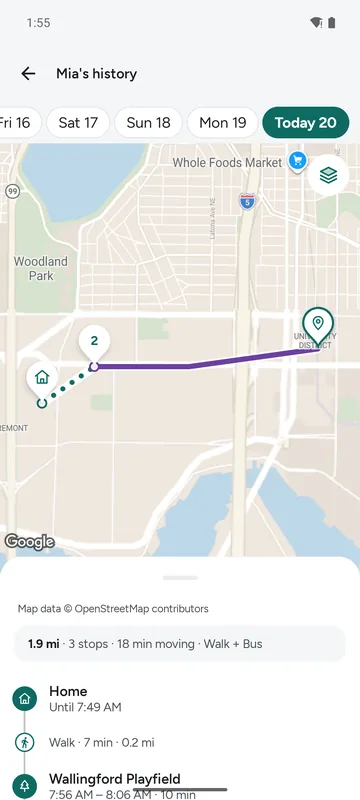
Mia's history: the route follows real roads, the stop at Wallingford Playfield is named, and the day sums up 1.9 mi, 3 stops, 18 min moving, walk and bus.

The school run.

Mia walks to the bus stop, rides Bus 44 and gets to school. You get one alert when Mia arrives, and the day’s trips are there if you want them.

  • Arrive and leave alerts for each saved place, free.
  • History tells walking, cycling, driving and bus or train apart.
  • Teens 13 to 17 join through a parent. Their phone always shows that sharing is on.
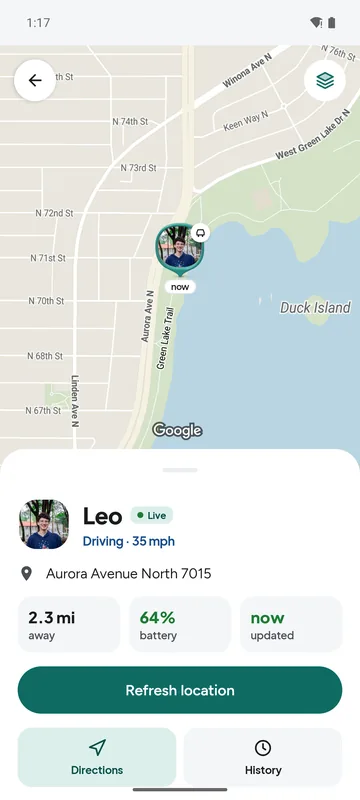
Leo's card on the map: driving at 35 mph on Aurora Avenue North, 2.3 mi away, 64 % battery, updated now, with Refresh location, Directions and History buttons.

A new driver in the family.

Leo just started driving. You see the speed on the road and the direction of travel, and get one alert when the drive is over. No stream of pings.

  • Speed shows only while driving, and only when the location is fresh.
  • A drive-finished alert for each person you choose.
  • A motorbike counts as driving; a bus or train ride never does.
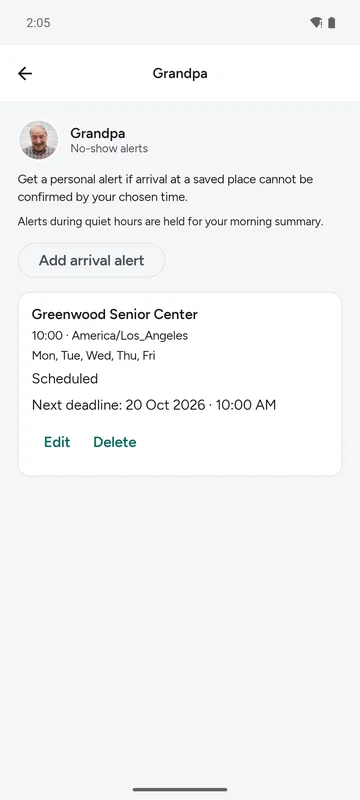
No-show alerts about Grandpa: Greenwood Senior Center by 10:00 AM on weekdays, scheduled.

Looking out for older parents.

Grandpa goes to the senior center every weekday morning. If the arrival can’t be confirmed by 10, you hear about it. If the phone is off, the app says so plainly.

  • Expected-arrival alerts on the days you choose.
  • Low-battery alerts, and a reason when a phone goes quiet: “Phone likely off (low battery)”.
  • A quiet phone is never shown as a missed arrival.
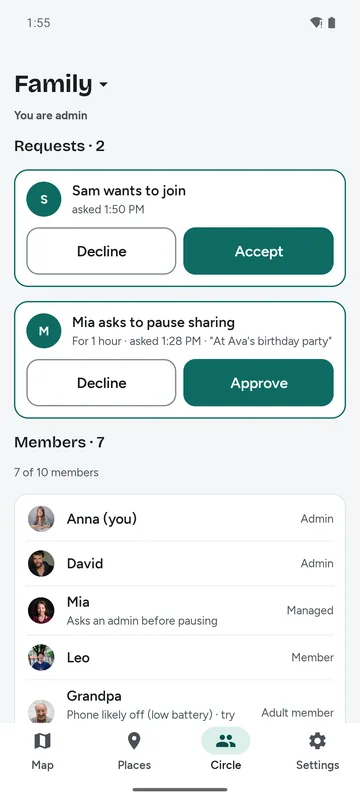
Circle admin: Sam asks to join, and Mia asks to pause sharing for one hour: At Ava's birthday party. Buttons to approve or decline.

Partners, college kids and visitors.

Noah is on the train back from campus and Grandma is flying in. Adults share on their own terms: pause any time, or leave a Circle, without having to explain.

  • Admins approve everyone who joins.
  • A managed teen asks before pausing, and can say why.
  • Up to 5 Circles: family, grandparents, the soccer team.

Honest about what it knows.

A dot on a map can be hours old and still look current. Family Nearby always says how old a location is, and gives a reason when a phone goes quiet. Try it: move the slider.

MiaWalking · North 45th Street
now
Mia is

A phone that stays still checks in every 30 minutes, so its location stays trusted longer.

  • Arrive and leave alerts are free.

    3 places per Circle on the free plan, each a circle or a shape you draw. Alerts come about a minute after someone gets there, so driving past does not count.

  • You choose every alert.

    Pick alerts per person and per type. Quiet hours hold them and send one summary in the morning. No marketing messages.

  • Knows a bus from a car.

    The app tells walking, cycling, driving, bus or train and flying apart, so a train ride is never counted as driving.

  • A person answers.

    Support replies within 48 hours. No chatbot maze, no upgrade pop-ups.

SOS, straight to your family.

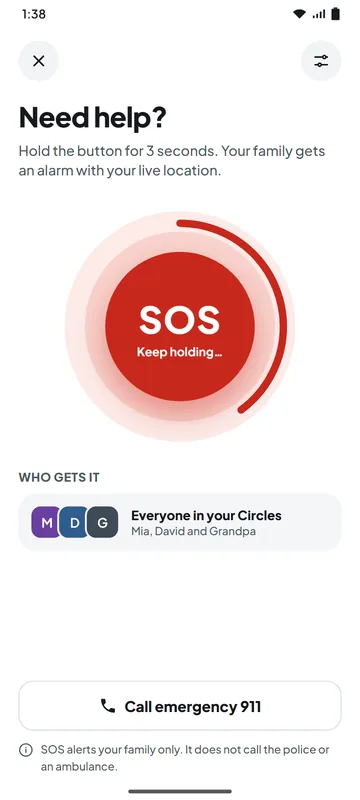
Hold the SOS button for 3 seconds. Everyone in your Circles gets a loud alarm with your live location, even when their phone is on silent, if they allow it. Free for every family.

  1. Need help? screen: a large red SOS button with Keep holding, who gets it (everyone in your Circles: Mia, David and Grandpa), and a Call emergency 911 button.

    Hold for 3 seconds.

    A short countdown follows, so a mistake is easy to cancel. Then your family gets the alarm.

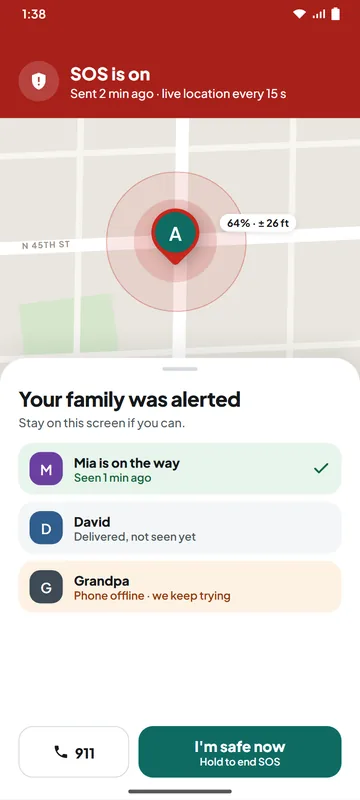
  2. SOS is on, sent 2 minutes ago with live location every 15 seconds: Mia is on the way, David has it but has not seen it yet, Grandpa's phone is offline. Buttons: 911 and I'm safe now.

    See who is coming.

    Each person shows delivered, seen or on the way. Your location updates every 15 seconds. Hold “I’m safe now” to end it.

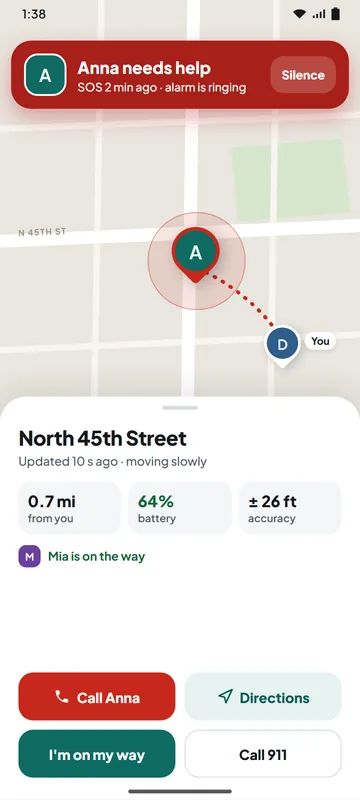
  3. Anna needs help, the alarm is ringing: Anna's pin on North 45th Street, 0.7 mi away, 64 % battery, Mia is on the way, and buttons to call Anna, get directions, say I'm on my way, or call 911.

    Your family knows where.

    The alarm rings until they silence it. They see your street, distance and battery, and can call you, get directions or tap “I’m on my way”.

See the real app.

Screens from the Android app, with a demo family in Seattle.

Family map of Seattle with photo pins: Anna walking near home, Leo and David driving with speed and a direction cone, Noah on Link light rail, Grandma flying in, Mia at Maple Hill Middle School, and Grandpa's phone offline with 4 % battery.

Everyone at a glance.

  • Photo pins show battery, and whether someone is walking, cycling, driving, on a bus or train, or flying, with speed while driving.
  • A cone shows which way a moving person is heading.
  • Each card says how long ago the location was updated. Check in with one tap.
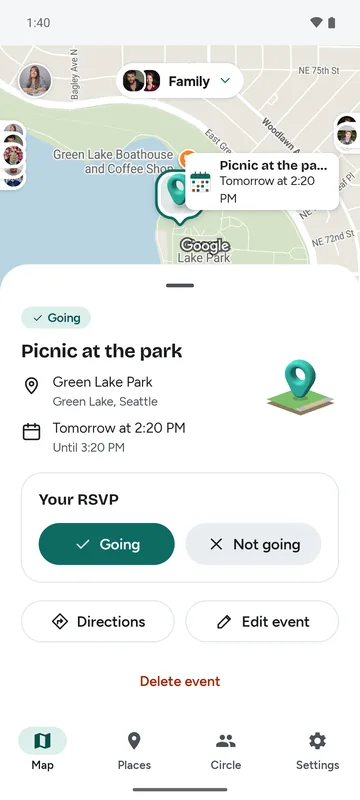
Picnic at the park, an event at Green Lake Park in Seattle: the map pin's calendar tile shows the name and Tomorrow at 2:20 PM, and the details sheet shows Going, the place, the time until 3:20 PM, Your RSVP with Going and Not going, Directions and Edit event.

Plan an event on the map.

  • Press and hold any spot on the map, then add an event there.
  • Choose the day, the time and who can see it: the whole Circle, a few people, or only you.
  • Reminders come 1 hour and 15 minutes before it starts. Each person answers Going or Not going.
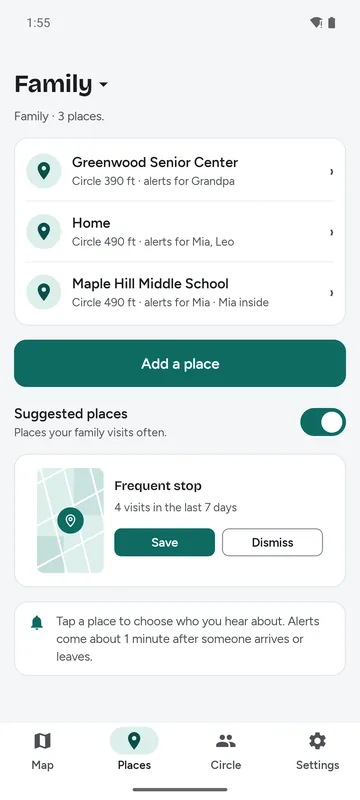
Suggested places: a frequent stop with a map thumbnail, 4 visits in the last 7 days, and Save and Dismiss buttons.

Places that matter.

  • Home, school, work: draw a circle, or your own shape for a big campus.
  • Suggested places: frequent stops you have not saved yet, private to you.
  • Save one in a tap, or dismiss it for 30 days.
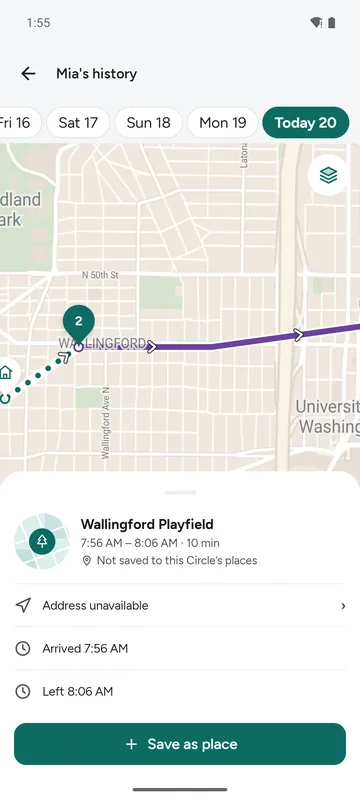
Wallingford Playfield, a stop in Mia's history: a 10-minute stop with arrival and departure times, not saved yet, and a Save as place button.

Turn a stop into a place.

  • Tap any stop in history to see when someone arrived and left.
  • Save as place makes it a family place, with arrive and leave alerts.
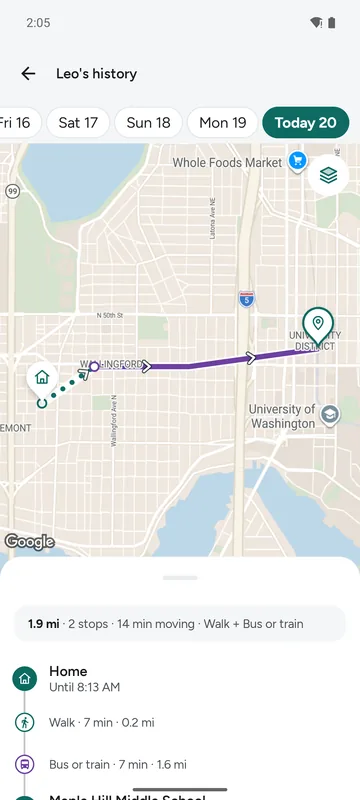
History for today on the free plan: Home, a short walk, bus or train, then Maple Hill Middle School, with History shows the last 7 days.

Up to 30 days of history.

  • 7 days free, 30 days with Plus (planned).
  • A summary of each day: distance, stops and time moving.
  • Numbered stops with times; trips labelled walk, bike, drive, or bus and train.
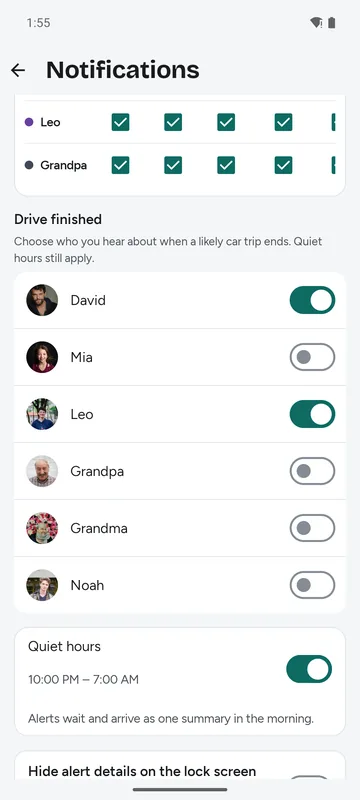
Drive finished alerts: a switch for each person in the Circle.

When a drive ends.

  • Choose whose drives you hear about.
  • One alert when a likely car trip ends, not a stream of speed alerts.
  • Quiet hours still apply.
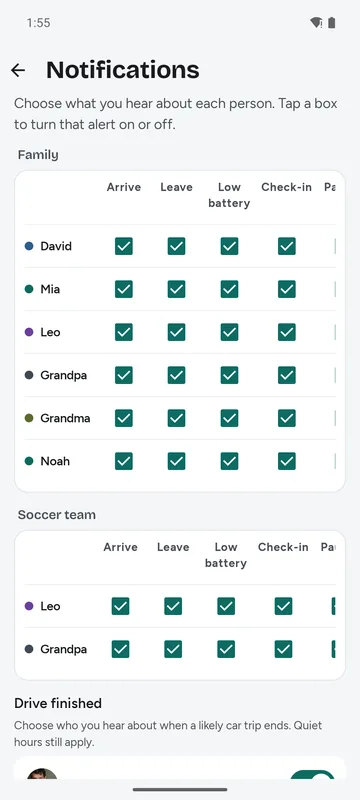
Notification settings: a grid of arrive, leave, low battery and check-in alerts for each person in Family and Soccer team, and the Drive finished section below.

Only the alerts you choose.

  • Arrive, leave, low battery and check-in, for each person.
  • Quiet hours send one summary in the morning.
  • Hide alert details on the lock screen if you like.
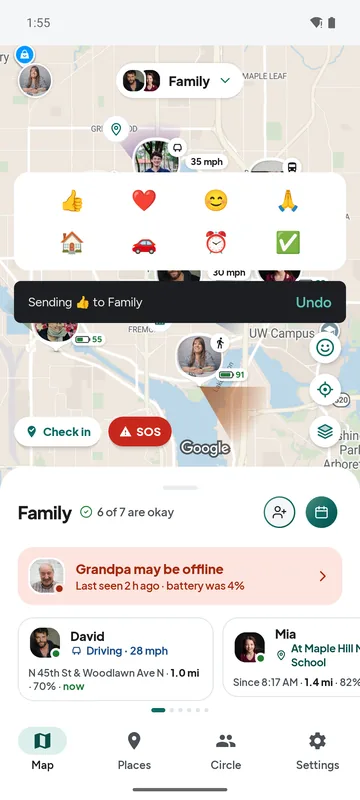
A row of eight emojis above the map and a message: Sending thumbs up to Family, with an Undo button.

Say it with one emoji.

  • Eight quick notes, like 👍, 🏠 or 🚗, sent to your Circle from the map.
  • You have 3 seconds to undo before anything is sent.
  • Admins turn emoji notes on for a Circle; they are off by default.
The family map in satellite view with photo pins over Seattle.

Satellite view, included.

  • Switch between map and aerial photos with street names.
  • No extra cost, on every plan.

One school morning.

Follow Mia from home to school. This is a sample route; nothing here uses a real location.

Mia left Home · updated 7:21 AM

Easy on your battery.

Location apps are known for draining phones. Family Nearby is built the other way round: it does as little as possible while nobody moves, and only works hard when someone is on the way.

Family Nearby: under 5 % of the battery a day — our design goal.

How we check it: a scripted day on real phones, with 16 hours still, 1.5 hours driving, 1 hour walking and 10 refreshes, must stay under 5 %. We run it on real phones and will publish the result here.

Every pin tells you more.

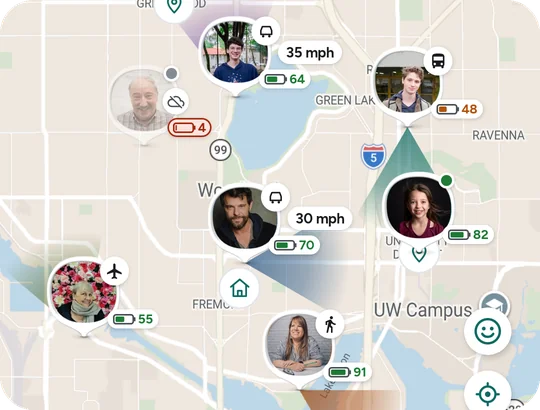
Seven photo pins on the Seattle map: Leo and David driving with speed and a direction cone, Noah on a train, Grandma flying, Anna walking, Mia at school with 82 % battery, and Grandpa offline with 4 % battery.
The family map as the app draws it.
  • How they’re moving. A small icon for walking, cycling, driving, bus or train, and flying.
  • Faces, not just letters. Add a photo and it shows on your pin and in the list. Parents can set a child’s photo.
  • Which way, and how fast. A cone shows the direction of a moving person. Speed shows in mph or km/h while driving.
  • Battery on every pin. Low battery turns amber, and a bolt means the phone is charging.
  • Offline, said plainly. A cloud mark and “Last seen 2 h ago” when a phone stops answering.
  • The latest emoji. A note someone sends shows on their pin for 10 minutes.

On your home screen.

The Check in widget sends your location to your Circles with one tap, without opening the app.

Check in widget: one large teal button on the home screen.

Sharing you can see.

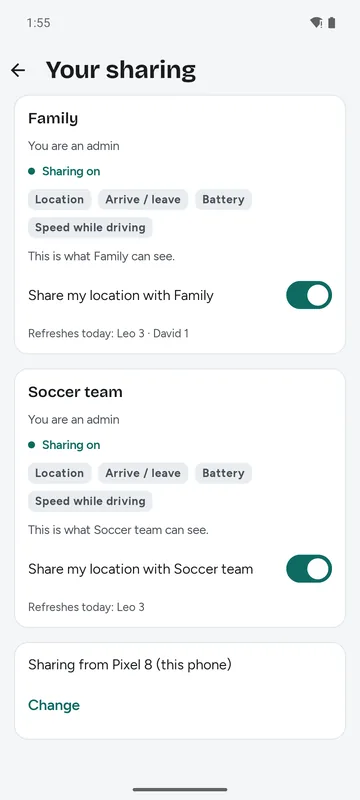
  • See exactly what your Circle sees: location, arrive and leave, battery, and speed while driving.
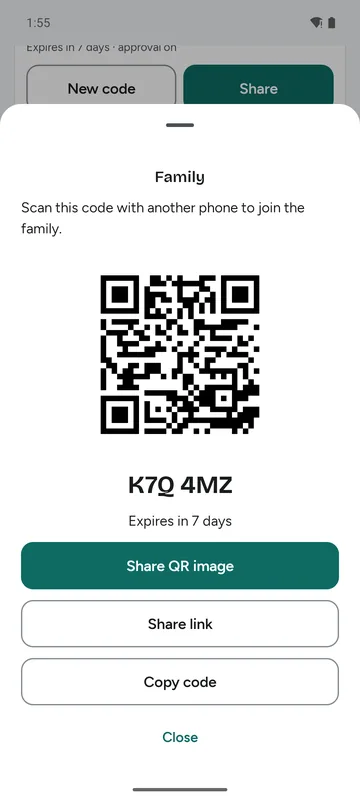
  • Admins approve everyone who joins. Invite with a code, a link or a QR code.
  • A managed teen asks before pausing, and can say why.
  • No hidden tracking: a phone that shares always shows it. With “While using the app” location access, your Circle sees you only while the app is open; arrive and leave alerts need “Allow all the time”.
  • Delete your account and data from Settings. It leaves our live systems within 30 days, and backups within 30 more days.
Your sharing screen: what Family can see (location, arrive and leave, battery, speed while driving) and a switch to share or pause.
Invite screen with a QR code for Family and the invite code.

The basics are free. For good.

Free

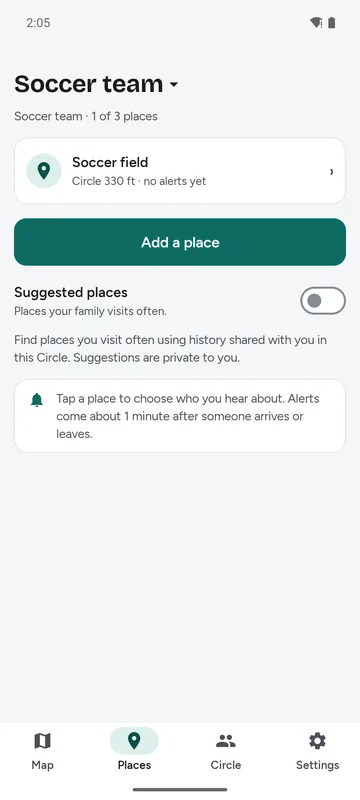
Places list of a free Circle: Soccer team, 1 of 3 places, and an Add a place button.
  • Up to 10 people per Circle, 5 Circles each
  • 3 places per Circle, with arrive and leave alerts
  • 7 days of history
  • Refresh, check-in, battery, drive and arrival alerts, and satellite view
  • SOS to your family, with a loud alarm and live location
  • History routes that follow real roads, with named stops and bus or train lines
  • No ads

Plus planned

Mia's history: the route follows real roads, the stop at Wallingford Playfield is named, and the day sums up 1.9 mi, 3 stops, 18 min moving, walk and bus.
  • Unlimited places
  • 30 days of history
  • SOS text messages to your Circle
  • One paying parent covers the whole Circle

Pricing is not set yet. A feature that is free today stays free.

Get the Android app

Questions.

When can I try it?

Family Nearby is available now on Android. Download it directly from Google Play using the link below to install the app on your phone.

Does it work on iPhone?

Not yet. Android comes first; an iPhone app is planned so families with both kinds of phone can use it. We will not call a platform available until it is.

Who can use Family Nearby?

People 13 and older. A teen aged 13 to 17 joins through a parent, who adds them from the parent’s own phone and agrees to share the teen’s location with the Circle. Nobody under 13 may use the app.

Who can see my location?

Only people in a Circle you joined, and only while your sharing is on in that Circle. Admins approve who joins. This website never asks for your location. See the privacy policy.

How do I stop sharing or leave?

Adults can pause sharing or leave a Circle at any time from Your sharing. A managed child asks an admin before pausing.

How will I know a location is up to date?

Every person shows how long ago their location was updated. When a phone goes quiet, the app says why if it can (for example, low battery or no network) and what to do next.

How much battery does it use?

Very little. It is designed to use under 5 % of a phone’s battery a day: no GPS while the phone is still, and GPS only on the move or near a saved place. We measure this on real phones, and we will publish the result.

Is Family Nearby free?

Yes, the basics are free: up to 10 people per Circle, 3 places with arrive and leave alerts, and 7 days of history. A paid Plus plan is planned for more places and 30 days of history; pricing is not set, and a feature that is free today stays free.

Is there a family locator app with no ads?

Yes: Family Nearby has no ads, no ad SDKs and no advertising id. Your data is never sold or shared with data brokers, and the basics stay free.

Does a family location app drain the battery?

Family Nearby is designed to use under 5 % of a phone’s battery a day, our design goal as we measure it on real phones. It uses no GPS while the phone is still, and turns GPS on only on the move or near a saved place. More in do family locator apps drain your battery?

Can I see where my teen is without them knowing?

No. A phone that shares its location always shows that sharing is on, so there is no hidden tracking. Teens aged 13 to 17 join through a parent, who agrees to share the teen’s location with the Circle. Read location sharing with teens: a parent’s guide.

How is Family Nearby different from other family locator apps?

It is honest about how old each location is, and the basics stay free. Arrive and leave alerts are free, a bus or train ride never counts as driving, there are no ads or upgrade pop-ups, and a person answers support within 48 hours.

Does it work outside the US?

Yes. The map works worldwide, and distances and times follow your phone’s settings: kilometres or miles, 12- or 24-hour clock. The app starts in English, with more languages later.

Can I delete my account and data?

Yes. Settings → Delete account and data. Your data leaves our live systems within 30 days after you confirm, and disappears from backups within 30 more days. You can also delete your account on the web.

Does Family Nearby have an SOS button?

Yes, free for every family. Hold SOS for 3 seconds, and everyone in your Circles gets a loud alarm with your live location. You see who saw it and who is on the way, and “I’m safe now” ends it. It ends on its own after 24 hours.

Is this an emergency service?

No. Family Nearby is not an emergency service. Its SOS alerts your family only: it does not call the police or an ambulance, and there is no crash detection. In an emergency, call your local emergency number.

Guides for families.

Get Family Nearby on Android.

Family Nearby is live on Google Play. You need an Android phone and a Google account.

  1. Get the app on Google Play

    Install Family Nearby on your Android phone to start sharing location with your family.

    Get it on Google Play
  2. Invite your family

    Create a Circle in the app and share your invite link with your family members.